Image

Why enterprise AI reliability starts with remediation, redaction, metadata, and retrieval governance

Most enterprise AI teams do not fail because the model is incapable.

They fail because the model is being connected to a data estate that was never prepared for retrieval.

That distinction matters.

A polished AI assistant can still produce weak, stale, overconfident, or unsafe answers if the retrieval layer underneath it is full of duplicated documents, obsolete files, low-quality OCR, under-classified records, broken permissions, and untraceable source material.

Retrieval-augmented generation is often discussed as if the core implementation problem is simple:

  • connect the data
  • embed the documents
  • ask a question
  • return an answer

But real enterprise data does not arrive in a clean, governed, model-ready shape.

It lives across file shares, SharePoint sites, CRM exports, legacy databases, internal wikis, policy folders, product documentation, support logs, scanned PDFs, spreadsheets, and operational systems that were never designed to feed AI workflows.

Some of that material is current.

Some of it is stale.

Some of it is duplicated.

Some of it contains PII, PCI, secrets, credentials, intellectual property, or internal-only context.

Some of it has no owner, no metadata, no classification, and no defined refresh path.

If that material is pushed into embeddings without remediation, the business does not get governed intelligence.

It gets a faster search interface over unmanaged risk.

The data layer decides whether RAG can be trusted

When RAG systems perform badly, teams often start by changing the visible AI layer.

They rewrite the prompt.

They swap the model.

They increase the context window.

They adjust the chunk size.

They test a different vector database.

Those changes can help, but they do not solve the deeper problem if the source material is unreliable.

Before the model can produce a grounded answer, the retrieval system has to answer a more basic set of questions:

  • Which sources are authoritative?
  • Which records are duplicated?
  • Which documents are obsolete?
  • Which content should be excluded?
  • Which data requires redaction?
  • Which chunks can each user role retrieve?
  • Which source changed, and what needs invalidating?
  • Which owner signs off the pipeline before release?

This is why enterprise RAG is not just an AI implementation problem.

It is a data remediation, security, governance, and operations problem.

The remediation work most teams underestimate

The phrase "clean your data" sounds too small for what production AI requires.

Enterprise remediation is not a cosmetic tidy-up.

It is the control layer that turns fragmented corporate data into retrieval-ready infrastructure.

That means building a pipeline that can:

  • inventory and score source systems
  • extract from legacy applications without damaging live operations
  • process unstructured documents through OCR and layout-aware parsing
  • remove redundant, obsolete, and trivial material
  • normalize inconsistent records and entity names
  • classify sensitivity before embedding
  • redact PII, PCI, secrets, credentials, and proprietary material
  • enrich documents and chunks with metadata
  • create chunking rules that preserve meaning
  • select embedding and hybrid retrieval strategies
  • tune vector storage and indexing behavior
  • enforce RBAC before content reaches the model context
  • apply TTL, cache invalidation, monitoring, and rollback controls
  • require release evidence before production use

Without those controls, the AI layer is operating on hope.

With them, the organization can start treating retrieval as infrastructure.

Five failure points that quietly weaken enterprise RAG

1. Legacy systems are connected before they are understood

Many organizations start by connecting whatever data source is easiest to access.

That creates a false sense of progress.

A useful retrieval system needs source classification first. The team has to know which repositories are authoritative, which are archival, which are sensitive, which are high value, and which require remediation before ingestion.

The goal is not to ingest everything.

The goal is to build a controlled route from trusted source material to answerable context.

2. Unstructured documents are flattened too early

PDFs, scans, DOCX files, HTML exports, tables, policies, manuals, and reports often lose meaning when they are extracted as raw text.

Tables become unreadable.

Headers detach from sections.

Footnotes lose their references.

Multi-column layouts collapse into noisy sequences.

If the extraction layer does not preserve structure, the chunking layer receives weak material, and the retrieval layer has less meaningful evidence to return.

Layout-aware extraction, OCR confidence checks, table serialization, quarantine rules, and source traceability should happen before embedding.

3. ROT content pollutes the index

ROT means redundant, obsolete, and trivial.

It is one of the quietest causes of retrieval failure.

Old policies, duplicate exports, copied manuals, outdated onboarding guides, expired pricing files, meeting invites, empty templates, boilerplate footers, and abandoned drafts can all compete with current source material.

When that content enters a vector index, the model may retrieve stale or low-value fragments with the same confidence as approved knowledge.

ROT removal is not optional in serious enterprise AI systems.

It is a retrieval quality control.

4. Sensitive data reaches the embedding layer

Sensitive data needs to be controlled before tokenization and embedding.

Once private material enters a vector store, removal becomes harder because the representation may live in embeddings, caches, indexes, summaries, logs, and downstream retrieval outputs.

An enterprise-grade pipeline needs classification and redaction gates before embedding.

That includes deterministic patterns for known formats, secret scanning, entity recognition, policy-based classification, exception handling, audit logs, and human review for high-risk cases.

Access control also has to happen before retrieval returns source text.

It is not enough to retrieve restricted chunks and ask the model not to reveal them.

Unauthorized material should not enter the context window.

5. The system has no invalidation loop

RAG systems age quickly.

Policies change.

Product documentation changes.

Customer commitments change.

Prices change.

Access permissions change.

Source records are updated, deleted, corrected, or superseded.

If the retrieval layer has no change data capture, TTL rules, cache invalidation, re-indexing logic, or review cadence, it slowly becomes less reliable while still looking operational.

That is one of the most dangerous failure modes in enterprise AI.

The answer still arrives.

It is just grounded in old reality.

What a hardened RAG data pipeline should contain

A production-ready data pipeline should include control points across the full path from source to answer.

At minimum, teams should be able to map:

  • source systems and ownership
  • extraction method and allowed load windows
  • OCR and document parsing rules
  • quarantine conditions for low-confidence material
  • duplicate and near-duplicate detection
  • obsolete content rules
  • normalization and entity resolution logic
  • security classification schema
  • redaction patterns and exception approvals
  • metadata requirements
  • chunking strategy by use case
  • embedding model selection criteria
  • hybrid retrieval behavior
  • vector database architecture
  • RBAC enforcement at retrieval time
  • TTL and cache invalidation logic
  • monitoring, rollback, and production sign-off

This is not bureaucracy.

It is what lets teams answer the question every enterprise AI initiative eventually faces:

Can we trust the material this system is retrieving?

A practical blueprint for teams building enterprise RAG
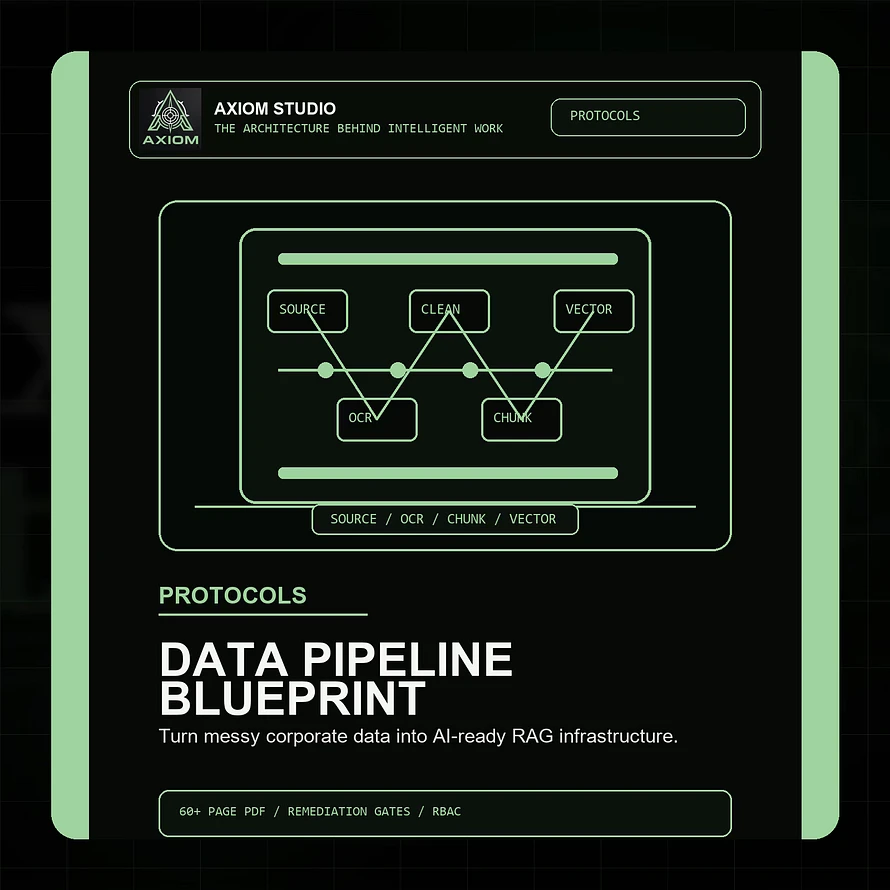
Axiom Product - Enterprise Data Remediation Pipeline Hardening Blueprint

The Axiom Enterprise Data Remediation & Pipeline Hardening Blueprint was built for this exact layer.

It is a premium technical protocol for data leaders, AI consultants, solutions architects, and engineering teams preparing messy corporate data for reliable retrieval-augmented generation.

The blueprint maps the full path from fragmented legacy sources to governed, AI-ready retrieval infrastructure:

  • AI data readiness assessment
  • target RAG data architecture
  • legacy silo extraction and CDC strategy
  • OCR and unstructured document processing
  • duplicate, obsolete, and trivial data removal
  • normalization and entity resolution
  • PII, PCI, secrets, and IP redaction gates
  • metadata enrichment
  • context-aware chunking
  • parent-child retrieval strategy
  • embedding model selection and cost mapping
  • hybrid retrieval using BM25 and dense vectors
  • vector database architecture and HNSW tuning
  • TTL, cache invalidation, and RBAC hardening
  • RAG pipeline canvas
  • production readiness and sign-off checklist

It is designed to help teams move from vague data-cleaning conversations to an actual operating blueprint.

Not another prompt pack.

Not another surface-level AI guide.

A structured implementation framework for the layer that decides whether enterprise AI can retrieve, reason, and respond from controlled knowledge.

Who this is best for

This blueprint is especially useful for:

  • Chief Data Officers
  • data engineering directors
  • enterprise data architects
  • solutions architects
  • database administrators
  • AI consultants building RAG systems
  • internal platform teams preparing data for AI assistants and agent workflows

If your organization is preparing internal data for AI search, knowledge assistants, agent workflows, customer-support copilots, analyst tools, or operational RAG systems, this is the layer to get right before scaling.

The real question before enterprise AI deployment

The question is not only:

Can the model answer?

The better question is:

What exactly is the model allowed to retrieve from?

Until that is clear, the AI system is only as reliable as the unmanaged data underneath it.

Before building another demo, fix the pipeline.

Before scaling retrieval, harden the source layer.

Before trusting outputs, control the path from corporate data to model context.

That is where enterprise AI reliability begins.

Get the blueprint

The Axiom Enterprise Data Remediation & Pipeline Hardening Blueprint gives teams a structured framework for turning fragmented corporate data into governed, secure, retrieval-ready AI infrastructure.

Use it to assess your current data estate, design a hardened RAG pipeline, define remediation controls, and prepare stronger release evidence before production deployment.

View the Axiom Enterprise Data Remediation & Pipeline Hardening Blueprint

Image

Why unmanaged AI browser sidebars create a quiet endpoint data-loss channel

The enterprise perimeter is shifting.

Security operations teams are hardening network firewalls, rolling out zero-trust access controls, protecting core cloud environments, and deploying EDR agents across corporate workstations.

Yet a quiet, high-velocity data exposure channel can still operate inside the everyday browser:

Consumer-tier AI browser extensions.

Employees install them for writing help, inline productivity, summarization, coding assistance, or quick debugging. The intent is usually harmless. The risk is that these tools often sit outside procurement, outside software inventory, outside security review, and inside the same browser sessions where proprietary code, customer records, internal dashboards, and SaaS applications are already open.

To understand why this matters, security leaders need to look at the mechanics of browser extension architecture. A benign productivity sidebar and an ill-intentioned data-loss engine can look uncomfortably similar at the permission layer.

The core threat vector: excessive permission architecture

Most users do not inspect a browser extension's permission model before clicking "Add to browser."

For consumer AI sidebars, the requested permission set can resemble a blueprint for a high-friction endpoint adversary:

{ "manifest_version": 3, "name": "Stealth Deep-Analysis Assistant Pro", "permissions": [ "activeTab", "clipboardRead", "storage", "webRequest" ], "host_permissions": [ "<all_urls>" ], "content_scripts": [ { "matches": ["<all_urls>"], "js": ["dom_scraper_inject.js"] } ] }

This does not mean every extension with broad permissions is malicious.

It means the permission surface must be treated as infrastructure risk, not user preference.

Several capabilities deserve particular scrutiny:

  • activeTab and broad host access: activeTab can give an extension temporary access to the active tab after user invocation. Combined with broad host permissions or content scripts matched against <all_urls>, an extension can read or alter page content across a wide range of sites. If an engineer is reviewing proprietary source code in a private repository, the extension may be able to inspect the same DOM the user can see.
  • clipboardRead: Clipboard access can expose copied API keys, access tokens, configuration snippets, customer notes, internal server names, or unreleased strategy text. Even short-lived clipboard data can become high-value material when captured at the wrong moment.
  • storage: Local or synced extension storage can preserve captured context, user prompts, page fragments, session metadata, or queued payloads for later transmission.
  • webRequest and network-related APIs: Network-facing extension permissions can allow request observation and, in some cases, request handling or routing behavior. Even when Manifest V3 narrows some blocking patterns, metadata visibility and outbound synchronization still create a meaningful data-governance concern.

The risk is not only that a malicious extension exists.

The risk is that an ordinary extension can become compromise-vulnerable, over-collected, poorly governed, acquired by another operator, or connected to retention policies the enterprise never approved.

Anatomy of a data leak: DOM harvesting and egress

Once embedded in the browser, a hostile or poorly governed AI extension can operate through local script injection.

A content script runs in the context of matching pages. It can observe input fields, editable regions, selected text, visible source snippets, page metadata, and other DOM-accessible content. The extension then passes selected material back to its background service worker for processing, storage, or synchronization.

A simplified abstraction looks like this:

// Simplified abstraction of inline DOM harvesting mechanics. document.addEventListener("keyup", () => { const activeElement = document.activeElement; const editable = activeElement && (activeElement.tagName === "INPUT" || activeElement.tagName === "TEXTAREA" || activeElement.isContentEditable); if (!editable) return; const textPayload = activeElement.value || activeElement.innerText || ""; const highValuePattern = /(def\s+[a-z0-9_]+\s*\(|const\s+[a-z0-9_]+\s*=\s*require|api[_-]?key|secret|token)/i; if (highValuePattern.test(textPayload)) { chrome.runtime.sendMessage({ type: "INLINE_HARVEST_EVENT", payload: textPayload, source_domain: window.location.hostname }); } });

When a threshold is triggered, the background worker can package the captured text and send it to an external endpoint through a normal HTTPS request.

That is what makes the issue operationally difficult. The traffic originates from a trusted browser process. It may use standard TLS. It may point to a cloud service that looks like ordinary SaaS traffic. Without extension inventory, DNS categorization, browser telemetry, CASB controls, or DLP inspection, the event can disappear into normal browsing patterns.

For source-code teams, the danger is direct:

  • private repository snippets can be read from web-based Git interfaces
  • pasted secrets can be captured from issue trackers, chat tools, or internal docs
  • code review comments can reveal architecture and vulnerability context
  • copied environment variables can pass through the clipboard
  • AI prompts can contain proprietary implementation details

This is Shadow AI at the browser layer: unauthorized AI tooling positioned inside an approved work session.

Systemic structural eviction: hardening the browser perimeter

Waiting for an explicit data-loss alert inside a SIEM dashboard creates unacceptable containment latency.

The stronger pattern is deterministic browser enforcement at the administrative layer. For Chromium-based environments, the goal is to move from user-choice extension installation to managed extension governance.

1. Move to a default-deny extension model

Set a master extension blocklist and then approve only reviewed extensions.

For Chrome on Windows, the blocklist policy can be configured under:

Hive: HKEY_LOCAL_MACHINE Path: Software\Policies\Google\Chrome\ExtensionInstallBlocklist Value Name: 1 Value Type: REG_SZ Value Data: *

With ExtensionInstallBlocklist set to *, all extensions are blocked unless they are explicitly allowed through the managed allowlist.

2. Maintain a sanctioned extension allowlist

Use ExtensionInstallAllowlist for approved extension IDs only.

Every allowed extension should have:

  • business owner
  • security owner
  • vendor review
  • data processing agreement where required
  • retention and training-use terms
  • permission justification
  • update monitoring
  • incident removal path

The allowlist should be reviewed as an operational control, not a one-time setup task.

3. Control extension developer mode and sideload routes

Unmanaged users may try to bypass the web store by loading unpacked extensions or launching browser profiles with custom flags.

Chrome environments should evaluate:

  • ExtensionDeveloperModeSettings to control the availability of developer mode on the extensions page
  • BlockExternalExtensions to block externally installed extensions
  • ExtensionInstallTypeBlocklist with command_line where command-line loading is a concern
  • DeveloperToolsAvailability where DevTools access itself needs to be restricted for managed environments

This distinction matters. DeveloperToolsAvailability is useful for controlling DevTools, but extension developer mode should be governed through extension-specific policies as well.

4. Add telemetry and egress controls

Policy enforcement should be paired with detection.

Security teams should monitor:

  • installed extension inventory by user and device
  • extension IDs and update sources
  • DNS requests to unsanctioned AI endpoints
  • OAuth grants to AI-connected applications
  • outbound requests from browser processes to unknown AI infrastructure
  • clipboard and secrets exposure signals where available
  • DLP patterns for source code, tokens, customer records, and regulated data

The objective is not to block productivity. It is to route AI usage through approved systems where data movement is visible, logged, and governed.

Building a resilient AI control stack

Shadow AI is not only a training problem.

It is an infrastructure configuration problem.

When employees are left to select their own utility toolchains, they will often optimize for immediate task speed. The enterprise has to optimize for long-term risk, customer commitments, intellectual property protection, auditability, and operational trust.

That requires a control stack:

  • managed browser policies
  • sanctioned AI tools
  • DLP and secrets detection
  • CASB and secure web gateway coverage
  • endpoint inventory
  • AI proxy routing
  • governance rules for prompts, files, and generated outputs
  • human review for high-risk workflows

The Axiom Enterprise AI Control Stack is designed around this broader operating problem: map the uncontrolled paths, define the approved paths, and enforce the difference.

For organizations that need immediate browser and endpoint containment guidance, the Axiom Corporate Shadow AI Mitigation & Security Manifest provides infrastructure rules, proxy maps, audit patterns, and browser enforcement variables for locking down unauthorized AI usage.

View the Corporate Shadow AI Mitigation & Security Manifest

Hardening the broader AI infrastructure

Evicting rogue browser sidebars is only the first layer of a mature enterprise AI posture.

Complete containment also requires controlling how data flows into, through, and out of authorized AI systems:

  • Data injection safeguards: Internal databases, document stores, and unstructured pipelines need inspection gates before material is used in AI workflows. The Axiom Enterprise Data Remediation & Pipeline Hardening Blueprint helps teams define remediation, classification, redaction, and retrieval-readiness controls.
  • Runtime guardrails: Agentic systems need deterministic validation modules, approval gates, and logging around tool calls, sensitive data, and high-risk actions. The Axiom Enterprise Multi-Agent AI Guardrail & Governance Framework helps teams structure those controls.
  • Context window optimization: Secure processing requires minimizing unnecessary data exposure. The Axiom Enterprise LLM Context Window Optimisation Blueprint helps teams prune, label, order, and verify the information sent into model context.

By taking control of the local browser environment, auditing extension permissions, and routing AI activity through a hardened corporate framework, security leaders can move from reactive tracking to resilient operating control.

The lesson is simple:

If AI runs inside the enterprise, the browser is part of the AI perimeter.

And the AI perimeter needs engineering discipline.

Image

The hidden data-layer problem behind unreliable enterprise AI systems

Most enterprise AI teams do not fail because the model cannot write a useful answer.

They fail because the model is being fed the wrong operating material.

Retrieval-augmented generation is often presented as a simple pattern:

Connect your company data.

Embed the documents.

Ask the model a question.

Return an answer grounded in the retrieved content.

That sounds clean. It is not how most corporate data environments behave.

Inside a real business, knowledge is scattered across file shares, SharePoint folders, internal wikis, old PDFs, CRM exports, support logs, spreadsheets, product documentation, meeting notes, database records, and legacy applications.

Some of it is current.

Some of it is duplicated.

Some of it is obsolete.

Some of it contradicts other material.

Some of it contains customer data, secrets, internal-only notes, or regulated information.

Some of it has no owner, no metadata, no permission model, and no clear update path.

If that material is pushed into a RAG system without remediation, the result is not enterprise intelligence.

It is automated confusion with a polished interface.

The model is not the first control point

When a RAG system gives weak answers, teams often start by blaming the model.

They change the prompt.

They switch embedding providers.

They increase the context window.

They test a larger model.

They tune the chunk size.

Those changes can help, but they do not fix the deeper issue if the retrieval layer is built on broken data.

The first control point is not the model.

The first control point is the source material.

Before a model can answer from approved knowledge, the business has to decide what counts as approved knowledge in the first place.

That means answering uncomfortable but necessary questions:

  • Which data sources are authoritative?
  • Which documents are outdated?
  • Which records contain regulated or sensitive data?
  • Which content should never reach an AI workflow?
  • Which data can be retrieved by which user role?
  • How are duplicate or conflicting records handled?
  • What happens when source content changes?
  • How does the team know the retrieval layer is still current?

Without those answers, RAG becomes a technical shortcut around a governance problem.

The five data failures that quietly break RAG

Most failed enterprise RAG systems have at least one of these problems underneath the interface.

1. Fragmented source systems

Corporate knowledge rarely lives in one clean repository.

It lives in disconnected systems with different formats, owners, permissions, naming conventions, and retention rules.

A RAG system that only ingests the easiest source will miss important context. A RAG system that ingests everything without structure will overload retrieval with noise.

The job is not simply to connect more sources.

The job is to classify sources by authority, sensitivity, freshness, and business use case.

2. Duplicate, obsolete, and trivial content

Many businesses have several versions of the same document.

Old onboarding guides. Archived policy PDFs. Copied procedure notes. Exported CRM records. Drafts that were never deleted. Spreadsheets with names like final, final-v2, and real-final.

When these assets enter a retrieval system, the AI may retrieve outdated guidance with the same confidence as current policy.

That creates answers that sound grounded but point to stale material.

Duplicate, obsolete, and trivial content needs to be removed, labeled, or demoted before embedding.

3. Weak metadata

RAG systems do not only need text.

They need context about the text.

Useful metadata might include:

  • source system
  • document owner
  • department
  • creation date
  • last reviewed date
  • permission group
  • content type
  • region
  • product line
  • customer sensitivity
  • retention class
  • authority level

Without metadata, retrieval has fewer ways to filter, rank, route, and validate source material.

The model may receive the right words but the wrong operational meaning.

4. Unsafe or under-classified data

Internal data often contains material that should not be sent into model context without controls:

  • personal data
  • payment information
  • health or legal records
  • access credentials
  • proprietary code
  • unreleased strategy
  • customer contracts
  • security architecture
  • internal incident notes

If the pipeline does not include classification and redaction gates, the RAG system can become a new data exposure path.

That risk increases when employees use broad prompts, agent workflows, automated summarization, or external model APIs.

5. No invalidation strategy

AI systems are often launched as if the data snapshot will stay useful.

It will not.

Products change. Policies change. Prices change. Support processes change. Customer commitments change. System architecture changes.

If the RAG layer has no change data capture, TTL policy, cache invalidation, re-indexing schedule, or review workflow, the system slowly becomes less reliable while still looking operational.

That is dangerous because the failure is quiet.

The answer still arrives.

It is just grounded in old reality.

Data remediation is not cosmetic cleaning

The phrase "clean your data" sounds too small for what enterprise AI actually requires.

Data remediation is not a tidy-up exercise.

It is the engineering work that turns unmanaged corporate material into retrieval-ready infrastructure.

A serious remediation pipeline needs to define:

  • source extraction rules
  • OCR and document conversion standards
  • duplicate and obsolete content removal
  • normalization patterns
  • entity resolution
  • sensitivity classification
  • PII, PCI, secrets, and IP redaction gates
  • metadata enrichment
  • chunking strategy
  • embedding and indexing rules
  • hybrid retrieval design
  • access control enforcement
  • cache and TTL policy
  • monitoring and release sign-off

This is the layer that decides whether the AI system is using governed knowledge or simply searching a messy content dump.

Why this matters for AI agents

The data problem becomes more serious when AI systems become agentic.

A basic chatbot can give a weak answer.

An agentic workflow can retrieve information, call tools, update systems, draft customer responses, prepare reports, trigger automations, or influence decisions.

If the underlying data layer is stale, duplicated, under-classified, or overexposed, the agent can act on bad context at operational speed.

That is why data remediation is not separate from AI governance.

It is part of AI governance.

Before an enterprise gives AI systems tool access, workflow responsibility, or customer-facing roles, it has to know that the knowledge layer underneath those systems is controlled.

What a production-ready RAG data layer needs

A production-ready RAG environment should be able to answer these questions clearly:

  • What sources are connected?
  • Which source is authoritative for each workflow?
  • What content was excluded and why?
  • How is sensitive data detected and handled?
  • What metadata is attached to every chunk?
  • How are permissions enforced at retrieval time?
  • How are stale records removed or refreshed?
  • How are retrieval failures logged?
  • Who signs off before the pipeline reaches production?
  • How does the business audit what the AI used to answer?

If those answers do not exist, the system is not production-ready.

It may still be useful as a demo.

It may still impress stakeholders.

But it is not yet reliable infrastructure.

Where Axiom Studio fits

The Axiom Enterprise Data Remediation & Pipeline Hardening Blueprint was built for this exact problem.

It is a technical implementation blueprint for teams preparing fragmented corporate data for reliable RAG infrastructure.

It covers the full path from legacy source systems through extraction, OCR, duplicate removal, normalization, redaction, entity resolution, chunking, embedding, vector storage, RBAC, TTL, monitoring, and production sign-off.

It is designed for data leaders, AI consultants, solutions architects, engineering teams, and operators who understand that successful enterprise AI depends on more than a model and a prompt.

The core idea is simple:

Reliable AI needs reliable retrieval.

Reliable retrieval needs governed data.

Governed data needs an operating pipeline.

View the Axiom Enterprise Data Remediation & Pipeline Hardening Blueprint
Final thought

RAG does not fail at the chat box.

It fails earlier, in the data layer.

If the source material is fragmented, stale, duplicated, unsafe, or disconnected from permissions, the model can only dress that weakness in better language.

The future of enterprise AI will not belong to the teams that connect the most data the fastest.

It will belong to the teams that build the strongest operating layer around the data before the model ever sees it.

Image

Why serious AI adoption depends on context architecture, data readiness, governance, and security control

Most organisations are no longer asking whether AI can be useful.

They already know it can.

The harder question is whether AI can be trusted inside the real operating environment of a business:

  • messy corporate data
  • legacy systems
  • regulated workflows
  • customer commitments
  • staff using public tools
  • unclear source ownership
  • security and compliance pressure
  • AI agents with access to tools, files, and APIs

This is where many AI projects get stuck.

The demo works. The pilot impresses. The prototype produces something useful. But the moment the system has to touch production data, answer from approved sources, respect permissions, avoid hallucinations, survive audit review, or integrate with existing infrastructure, the project slows down.

That is not a model problem.

It is an operating architecture problem.

At Axiom Studio, we built the Enterprise AI Control Stack for exactly this point in the adoption curve.

It is a collection of four premium technical protocols for teams, consultants, founders, architects, and operators who want to move beyond AI experimentation and build systems with structure, controls, and implementation discipline.

Explore the full Enterprise AI Control Stack

The four layers every production AI system needs

A serious enterprise AI system is not just a model connected to a chat interface.

It is a stack.

It needs a data layer, a retrieval layer, a context layer, a governance layer, and a security layer. Each layer has a different job, and each layer can become the reason the whole system fails.

If the data is messy, retrieval becomes unreliable.

If retrieval is weak, the context window becomes noisy.

If the context window is unmanaged, the model becomes easier to mislead.

If agents are given tools without control gates, automation becomes operational risk.

If employees use public AI tools outside approved systems, sensitive data can leave the business silently.

The Enterprise AI Control Stack is designed around those four major failure points:

  • Context architecture: how information enters and gets used by the model.
  • Data remediation: how corporate data becomes retrieval-ready.
  • Agent governance: how autonomous AI workflows are controlled and audited.
  • Shadow AI security: how unauthorized AI usage is discovered and contained.

Together, these four products form a practical operating system for production AI readiness.

1. Enterprise LLM Context Window Optimisation Blueprint

Enterprise LLM Context Window Optimisation Blueprint product image

The first control layer is the context window.

Most businesses think of the context window as a bigger box for more information. That is the wrong mental model.

In production AI systems, the context window is an operating surface. It decides what the model sees, what it ignores, what it treats as instruction, what it treats as evidence, and what it has enough room to explain.

When the context window is unmanaged, teams run into the same problems again and again:

  • too much irrelevant retrieved material
  • weak token budgeting
  • source evidence mixed with user instruction
  • outdated data crowding out current policy
  • examples consuming room needed for output
  • no clear rule for compression or exclusion
  • RAG chunks arriving without useful metadata

The Enterprise LLM Context Window Optimisation Blueprint gives teams a technical protocol for designing how information gets selected, ordered, compressed, labelled, and verified before it reaches the model.

It covers token budgeting, retrieval architecture, RAG chunking strategy, metadata schemas, prompt packet design, evaluation gates, governance controls, and implementation worksheets.

This is valuable for anyone building customer-facing assistants, internal knowledge tools, research workflows, support copilots, or retrieval-based AI systems.

The practical outcome is simple:

The model gets a cleaner operating surface, and the team gets a repeatable way to control the information entering that surface.

View the Context Window Optimisation Blueprint

2. Enterprise Data Remediation & Pipeline Hardening Blueprint
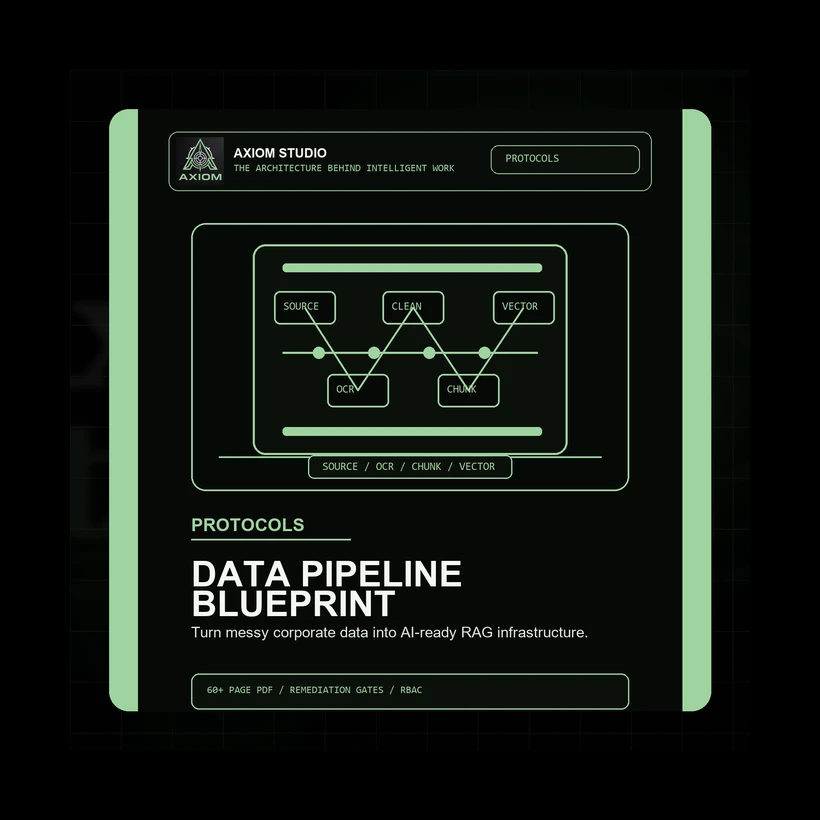
Enterprise Data Remediation & Pipeline Hardening Blueprint product image
Before an AI system can answer from company knowledge, the company knowledge has to be usable.

That sounds obvious, but it is where many RAG projects break.

Corporate data is rarely clean, current, structured, permissioned, and ready for retrieval. It is usually scattered across file shares, SharePoint folders, old PDFs, scanned documents, CRM records, support exports, spreadsheets, internal wikis, database tables, and legacy applications.

Connecting AI to that environment without remediation creates a retrieval layer full of noise.

The Enterprise Data Remediation & Pipeline Hardening Blueprint focuses on the data foundation underneath enterprise AI.

It gives teams a technical implementation framework for turning fragmented corporate data into AI-ready RAG infrastructure.

Inside, it covers:

  • AI data readiness assessment
  • legacy source extraction
  • change data capture strategy
  • OCR and unstructured document processing
  • duplicate, obsolete, and trivial data removal
  • structural Markdown and JSON-LD conversion
  • PII, PCI, secrets, and IP redaction gates
  • entity resolution and knowledge graph links
  • context-aware chunking
  • metadata enrichment
  • embedding model selection
  • hybrid retrieval design
  • vector database hardening
  • TTL, cache invalidation, and RBAC controls

This blueprint is for the teams who understand that “clean your data” is not a strategy.

The real work is building a controlled pipeline where data can be extracted, cleaned, classified, chunked, embedded, permissioned, refreshed, and audited.

That is the difference between a RAG demo and a retrieval system the business can rely on.

View the Data Remediation & Pipeline Hardening Blueprint

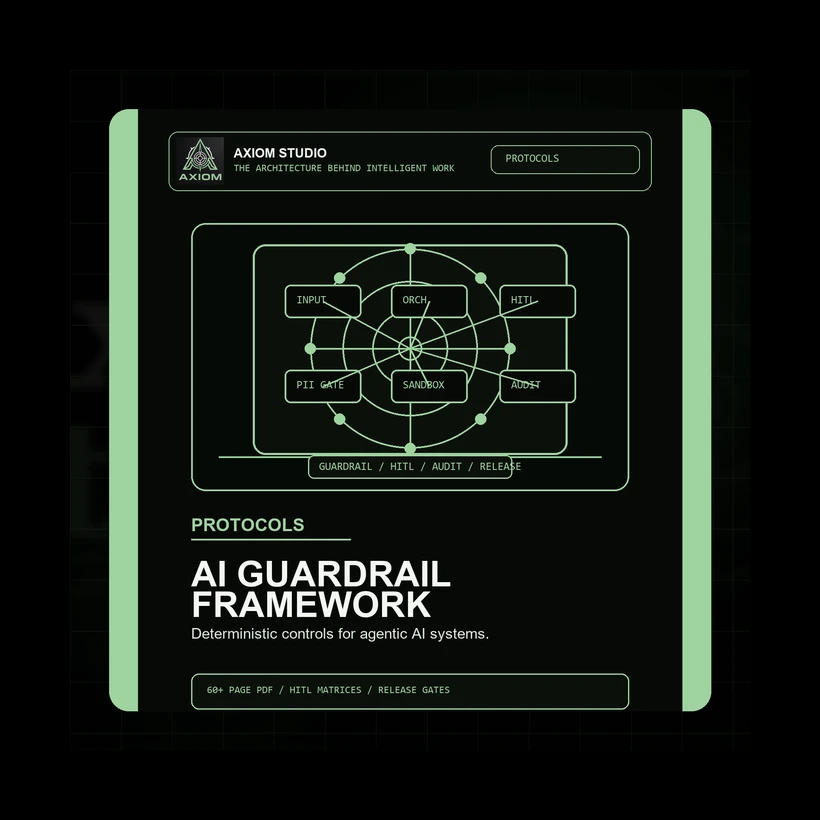
3. Enterprise Multi-Agent AI Guardrail & Governance Framework

Enterprise Multi-Agent AI Guardrail & Governance Framework product image

Once AI systems become agentic, the risk changes.

A single assistant drafting an answer is one thing.

A multi-agent workflow that can call tools, retrieve data, hand work between agents, execute actions, create recommendations, or trigger downstream systems is something else entirely.

At that point, the business needs more than “good prompts.”

It needs deterministic control layers.

The Enterprise Multi-Agent AI Guardrail & Governance Framework is built for the transition from impressive AI pilot to governed production workflow.

It helps teams define:

  • what agents are allowed to do
  • which tools they can call
  • when they must stop
  • when a human must approve
  • how state transitions are controlled
  • how outputs are checked against evidence
  • how risky actions are contained
  • how incidents are logged and reviewed
  • what release evidence is required before production use

The framework covers governance architecture, input guardrails, agent orchestration controls, tool execution and sandbox hardening, blast-radius limits, grounding verification, human-in-the-loop gates, auditability, observability, rollback, and production release standards.

This is especially useful for consultants, automation agencies, CTOs, enterprise architects, and product teams building AI workflows that need to perform real business operations.

The goal is not to remove autonomy.

The goal is to make autonomy bounded, inspectable, and safe enough to use.

View the Multi-Agent Guardrail & Governance Framework

4. Corporate Shadow AI Mitigation & Security Manifest

Corporate Shadow AI Mitigation & Security Manifest product image

The final layer is security.

Even if a company builds an approved AI system, employees may still use public AI tools outside the official environment.

They paste customer data into consumer chat tools.

They install browser extensions that inspect page content.

They connect cloud storage to AI apps through OAuth.

They use personal API keys.

They test proprietary source code in unmanaged developer assistants.

That is Shadow AI.

The risk is not theoretical. It is operational, quiet, and difficult to control with policy alone.

The Corporate Shadow AI Mitigation & Security Manifest gives IT and security teams a technical framework for detecting, containing, and governing unauthorized AI usage across the enterprise.

It covers:

  • Shadow AI threat mapping
  • DNS and URL classification
  • secure web gateway controls
  • deep packet inspection
  • CASB discovery
  • endpoint auditing
  • browser GPO hardening
  • OAuth and API key audits
  • DLP regex and content fingerprinting
  • corporate AI proxy gateway architecture
  • SIEM logging schemas
  • incident response playbooks
  • offboarding and supply-chain exposure audits
  • a copy-ready PowerShell browser extension audit script

This product is designed for IT Directors, CISOs, network security engineers, infrastructure teams, cloud compliance officers, and security consultants.

The core argument is clear:

Shadow AI does not disappear because the business says “do not use it.”

It disappears when unauthorized usage becomes visible, sanctioned access becomes easier, and high-risk data movement is technically enforceable.

View the Shadow AI Mitigation & Security Manifest

Why these four products belong together

Each product solves a different part of the enterprise AI readiness problem.

The context blueprint controls the model’s working surface.

The data pipeline blueprint prepares the knowledge layer feeding retrieval.

The guardrail framework controls autonomous workflows and agent decisions.

The Shadow AI manifest protects the business from uncontrolled AI usage outside approved systems.

You can use them individually, but they are strongest as a stack.

Together, they help answer the questions that matter before AI touches meaningful business operations:

  • Is the source data usable?
  • Is the retrieval layer governed?
  • Is the context window controlled?
  • Are agent actions bounded?
  • Are outputs verified?
  • Are human approval gates defined?
  • Are logs and audit trails available?
  • Are security controls enforced?
  • Are employees given a sanctioned route for AI work?
  • Can the system be monitored, improved, and rolled back?

That is what production AI requires.

Not hype.

Not scattered prompt experiments.

Not another pilot that never reaches operational trust.

It requires an operating stack.

Explore the Enterprise AI Control Stack

The Enterprise AI Control Stack is built for teams who want to move from experimentation to structured implementation.

It is for operators who understand that AI success depends on architecture, data quality, governance, security, and repeatable workflow design.

Explore the full collection here:

View the Enterprise AI Control Stack

Or go directly to each product:

The future of enterprise AI will not be won by the team with the most experiments.

It will be won by the teams that build the strongest operating layer around intelligent work.

Image

How protocols, agent kits, and workbooks turn AI from a useful tool into a repeatable way of working

Most people do not have an AI problem.

They have a workflow problem.

The AI is usually capable enough to help. The model can write, summarise, compare, draft, reason, plan, critique, restructure, classify, and explain. It can be useful in a dozen different ways before you have even finished your coffee.

The problem is that most AI sessions begin with the same fragile ritual:

Open a chat box. Ask for something. Hope the answer is good. Try again when it is not.

That is fine for exploration.

It is not enough for serious work.

If you are using AI for research, content, proposals, planning, customer support, business analysis, learning, technical delivery, or operational decisions, you need more than a clever prompt. You need a way of working that can survive Tuesday afternoon, a vague brief, missing context, three tabs of notes, and your own optimism.

That is where a complete AI workflow comes in.

At Axiom Studio, we think useful AI work is built from three core pillars:

  • Protocols define the operating process.
  • Agent Kits define the assistant behaviour.
  • Workbooks build the human practice around the workflow.

Together, they turn AI from "a box you ask things" into a repeatable working system.

This article explains how that system works.

The old pattern: prompt, hope, repeat

Most people start with prompt-first thinking.

They ask:

"What should I type into the AI?"

That question is understandable. Prompts are visible. Prompts feel like the thing you control. A better prompt can absolutely improve the result.

But prompt-first thinking has a ceiling.

It often creates sessions like this:

  • The first answer is too broad.
  • The second answer is better, but still misses context.
  • The third answer sounds confident, but you are not sure whether it is true.
  • The fourth answer is closer, but now the conversation has become messy.
  • The fifth answer is something you copy into a document called "final-final-new-v3", which is a cry for help disguised as file management.

The issue is not that the prompt was bad.

The issue is that the workflow was never designed.

The better pattern: define the system before asking for output

A strong AI workflow does not begin with the prompt.

It begins with the work.

Before you ask AI to produce anything, define:

  • what task you are actually running
  • what good output looks like
  • what context the AI needs
  • what role the AI should play
  • what constraints matter
  • what risks need review
  • what format the result should arrive in
  • what you will do with the output afterwards

This shifts the session from improvisation to structure.

Instead of asking AI to "help with content", you run a content production workflow.

Instead of asking AI to "summarise this research", you run a research synthesis workflow.

Instead of asking AI to "write a proposal", you run a proposal development workflow with scope, assumptions, risks, deliverables, and review gates.

The difference is huge.

A prompt asks for a result.

A workflow defines how the result should be created, checked, improved, and reused.

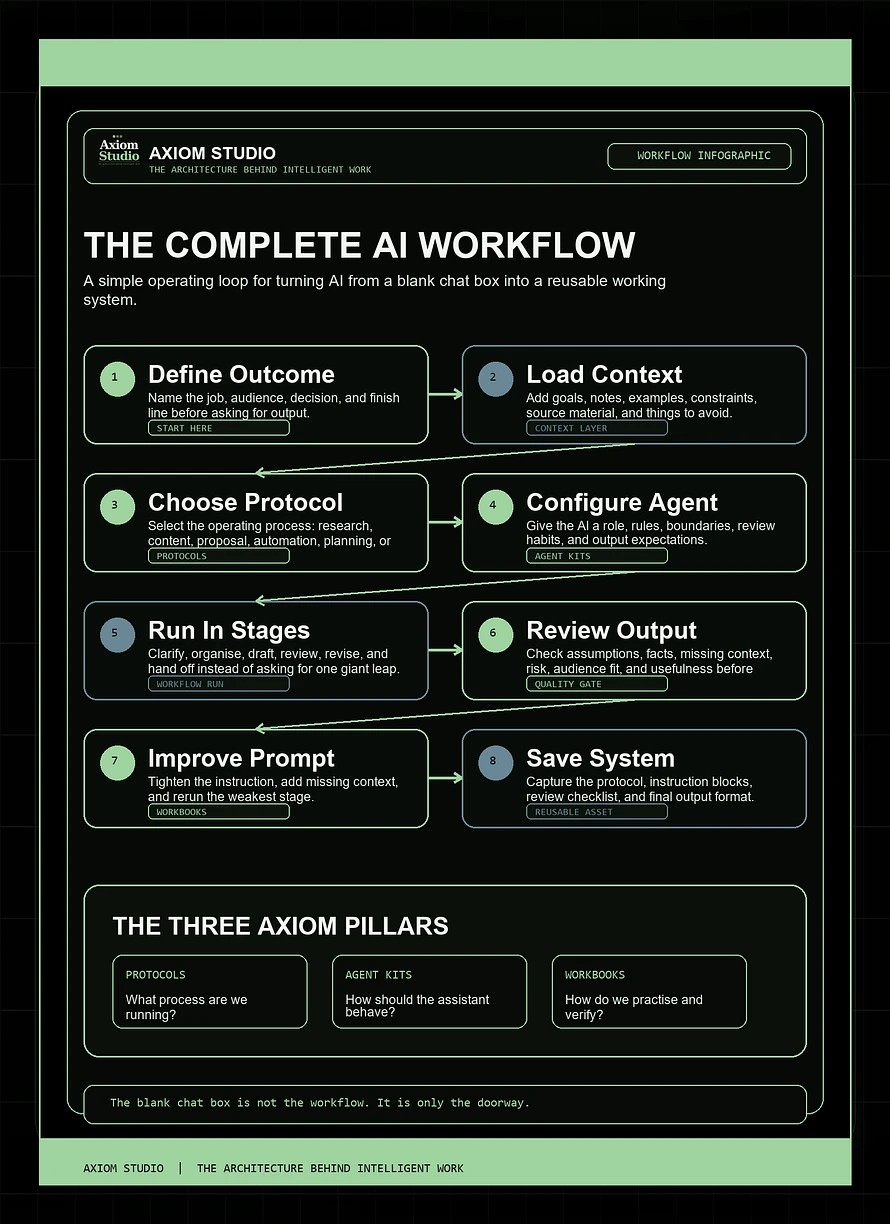
The complete AI workflow loop

A useful AI workflow has eight practical stages.

You do not need to make this complicated. You do need to make it visible.

1. Define the outcome

Start by naming the job.

Not the tool. Not the model. Not the prompt.

The job.

For example:

  • Create a first draft of a client proposal.
  • Compare three product ideas.
  • Turn meeting notes into an action plan.
  • Review an AI-generated article for weak assumptions.
  • Build a reusable onboarding checklist.
  • Analyse a business process for automation opportunities.

The clearer the outcome, the less the AI has to guess.

Good outcome definition includes:

  • the intended result
  • the audience or user
  • the decision the output supports
  • the quality level required
  • the point where the work is considered finished

If you cannot define the outcome, the AI cannot reliably help you reach it.

2. Load the context

AI does not know what matters unless you tell it.

Context is not decoration. It is operating material.

Useful context can include:

  • business goals
  • audience details
  • brand voice
  • project notes
  • customer pain points
  • constraints
  • examples
  • source material
  • past decisions
  • preferred formats
  • things to avoid

This is where many sessions fail. People give AI the task, but not the environment the task lives inside.

Then the AI fills the gaps with generic assumptions.

And generic assumptions are very polite. They arrive nicely formatted and pretend they were invited.

3. Choose the protocol

Once you know the outcome and context, choose the operating protocol.

The protocol is the workflow structure.

It defines:

  • the task sequence
  • the questions to answer
  • the decision criteria
  • the output stages
  • the quality-control checks
  • the handoff format

Different work needs different protocols.

A research workflow needs source discipline and evidence checks.

A content workflow needs audience, angle, structure, draft, revision, and repurposing steps.

A proposal workflow needs scope, assumptions, deliverables, risk review, and client-readiness checks.

An automation workflow needs task inventory, suitability scoring, failure impact, and human-review boundaries.

This is why Axiom Studio builds Protocols as a core product line. They give you the repeatable operating layer, so you are not rebuilding the same process every time you open an AI tool.

Explore Protocols: https://axiom-studio.co/collections/protocols

4. Configure the assistant

The protocol defines the process.

The assistant defines the behaviour.

This is where an Agent Kit becomes useful.

An Agent Kit gives the AI a specialist role, rules, boundaries, review habits, and output expectations.

For example, a research assistant should behave differently from a content strategist.

A quality reviewer should not simply praise the work. It should inspect it, challenge it, score it, and identify what needs revision.

A business analyst should diagnose a workflow before recommending tools.

A coding assistant should clarify intent, respect existing architecture, avoid unnecessary rewrites, and verify changes before calling the work finished.

Good assistant instructions tell the AI:

  • what role it is playing
  • what it should prioritise
  • what it must avoid
  • what questions it should ask
  • how it should structure outputs
  • when it should flag uncertainty
  • how it should review its own work

This turns AI from a general-purpose response machine into a more reliable working partner.

Explore Agent Kits: https://axiom-studio.co/collections/agent-kits

5. Run the workflow in stages

Do not ask AI to do the entire job in one heroic leap.

That is how you get long, confident output with hidden cracks.

Run the workflow in stages.

For example:

  1. Clarify the task.
  2. Organise the context.
  3. Produce a first version.
  4. Review against criteria.
  5. Revise with constraints.
  6. Create the final handoff.

This staged approach creates more control.

It also makes it easier to see where the workflow is breaking.

If the output is weak, you can ask:

  • Was the outcome unclear?
  • Was context missing?
  • Was the wrong protocol used?
  • Were the assistant instructions too loose?
  • Was the review step skipped?
  • Was the output format poorly defined?

That is much better than staring at the screen thinking, "Well, the machine has produced words again."

6. Review before trusting

This is the step many people skip.

It is also the step that separates casual AI use from professional AI use.

AI output should be reviewed before it is trusted, published, sent, used in a decision, or built upon.

Review does not have to be dramatic. It just needs to be consistent.

Check for:

  • missing context
  • unsupported claims
  • weak assumptions
  • unclear recommendations
  • poor fit for the audience
  • hallucinated details
  • overconfident language
  • risk areas that need human judgement
  • output that sounds good but does not actually solve the problem

This is where Axiom Studio Workbooks matter.

Workbooks help users build the skill of checking, improving, and repeating AI work. They turn AI from a one-off output generator into a practice environment.

Explore Workbooks: https://axiom-studio.co/collections/workbooks

7. Turn the result into a reusable asset

The best AI session should not disappear when the chat ends.

If a workflow worked, save it.

Capture:

  • the task type
  • the context used
  • the protocol steps
  • the assistant instructions
  • the prompt blocks
  • the review checklist
  • the output format
  • what you would improve next time

This creates reusable workflow assets.

Over time, you stop starting from a blank chat box and begin working from a growing library of operating systems.

That is the real productivity gain.

Not faster typing.

Better reuse.

8. Improve the human system

AI workflows are not only about the AI.

They are about the human system around the AI.

The person using the tool still has to:

  • define the work
  • recognise bad output
  • ask better follow-up questions
  • understand risk
  • decide what matters
  • review the final result
  • improve the process

That means AI capability is a practice, not just a purchase.

You can buy a powerful tool and still use it badly.

You can also use a simple tool extremely well if your workflow is clear.

The goal is not to become dependent on AI.

The goal is to become better at directing intelligent systems.

How the three Axiom pillars work together

Here is the simple version.

Protocols answer:

What process are we running?

Agent Kits answer:

How should the AI behave while running it?

Workbooks answer:

How do we practise, verify, and improve the way we use it?

You can use each pillar on its own.

But they become stronger together.

A protocol without a good assistant can still produce inconsistent behaviour.

An agent without a workflow can become a very confident assistant with nowhere useful to go.

A workbook without implementation can become learning that never turns into practice.

Together, they create a complete operating stack:

  • define the work
  • configure the assistant
  • run the workflow
  • review the output
  • practise the skill
  • save the system
  • improve it next time

That is the architecture behind intelligent work.

A practical example: turning a messy idea into usable work

Imagine you want to create a new offer for your business.

The prompt-first version might be:

"Give me some product ideas for my business."

You might get a list. Some ideas may be useful. Some may be generic. Some may sound like they were assembled from the internet's spare parts drawer.

The workflow version looks different.

First, you define the outcome:

"I need three realistic product ideas that fit my audience, can be delivered within two weeks, and could become repeatable digital assets."

Then you load context:

  • current audience
  • existing products
  • common customer problems
  • available skills
  • pricing range
  • delivery constraints
  • examples of offers that fit the brand

Then you choose a protocol:

  • idea inventory
  • audience fit
  • value scoring
  • delivery complexity
  • risk check
  • next-action plan

Then you configure the assistant:

"Act as a practical business analyst. Prioritise realistic offers over exciting but fragile ideas. Challenge assumptions. Score each idea using audience fit, build effort, repeatability, and revenue potential."

Then you run the workflow in stages.

Then you review the output.

Then you turn the best result into a saved workflow for future product development.

That is no longer a random AI chat.

That is a working system.

The takeaway

AI is useful when it helps you think, build, review, and repeat.

It is much less useful when every session starts from nothing and ends in a pile of unverified text.

The future of AI work is not just better prompts.

It is better operating systems.

At Axiom Studio, we are building resources for people who want to use AI with more structure, more control, and more repeatability.

Protocols help define the workflow.

Agent Kits help configure the assistant.

Workbooks help build the practice.

Together, they help turn AI from a clever tool into a dependable part of how work gets done.

Explore the full Axiom Studio library: https://axiom-studio.co/collections/all

Because the blank chat box is not the workflow.

It is only the doorway.

Image

Why better AI results come from better systems, not just better prompts

Most people begin using AI the same way.

They open a chat box, type a hopeful request, wait for the answer, and then decide whether the result is useful, strange, impressive, confidently wrong, or somehow all four at once.

That is normal. It is also the first stage of learning any new tool.

But if you want AI to become useful in your actual work, you eventually hit a wall.

The wall sounds something like this:

"Why was it brilliant yesterday and completely unhelpful today?"

Or:

"Why did it ignore the thing I literally just told it?"

Or the classic:

"This looks good, but I have no idea whether I should trust it."

That is the point where better prompts are not enough.

You need a workflow.

The prompt is not the whole system

Prompts matter. A vague prompt usually creates vague output. A clear prompt usually gets you closer to useful work.

But a prompt is only one part of the operating system.

For professional work, the quality of an AI result depends on more than the words you type into the box. It depends on:

  • the task you choose
  • the context you provide
  • the constraints you set
  • the role you ask the AI to play
  • the output format you require
  • the review process you apply
  • the decision you make after the output arrives

If any of those are missing, the AI has to guess.

And AI is very good at guessing in a way that sounds polished.

That is the awkward bit. A weak AI output does not always look weak. Sometimes it wears a nice jacket and speaks in bullet points.

The real shift: from prompt to protocol

At Axiom Studio, we think the next stage of AI adoption is not about collecting more prompt packs.

It is about building operating protocols.

A protocol is a repeatable way to get work done. It defines the task, the context, the rules, the output, the review process, and the handoff.

Instead of asking:

"What should I prompt?"

Ask:

"What workflow am I trying to run?"

That one question changes everything.

If the workflow is research, you need source discipline, evidence mapping, contradiction checks, and a synthesis format.

If the workflow is content production, you need audience context, brand rules, structure, draft stages, review criteria, and repurposing logic.

If the workflow is client proposals, you need discovery notes, scope boundaries, assumptions, deliverables, risk checks, and a pre-send review.

If the workflow is coding with an agent like Codex, you need task framing, repository context, verification commands, diff review, and human approval gates.

The AI can help with all of that.

But it needs the workflow around it.

AI should not be trusted or dismissed too quickly

There are two common mistakes people make with AI.

The first is trusting it too quickly.

The second is dismissing it too quickly.

Both come from the same problem: no review system.

If you trust everything the AI gives you, you risk building on weak assumptions.

If you dismiss everything that is not perfect on the first try, you miss the fact that the first output may simply need better context, clearer constraints, or a structured revision loop.

The useful path is in the middle:

  1. Give the AI a clear job.
  2. Give it the right context.
  3. Ask for the output in a usable structure.
  4. Review the output against a standard.
  5. Improve the instruction.
  6. Save what works.

That is where AI becomes less mysterious.

It stops being a slot machine for ideas and starts becoming part of a working process.

What a good AI workflow looks like

A strong AI workflow has five parts.

1. A clear trigger

When should this workflow be used?

Not every task needs AI. Some tasks are too sensitive, too unclear, too human, or too simple.

A good workflow starts by defining the moment it should run.

Example:

  • "When I finish a client discovery call, run the proposal structure workflow."
  • "When I have a rough article idea, run the content brief workflow."
  • "Before I publish or send AI-assisted work, run the verification workflow."

2. Defined inputs

AI output is only as strong as the context behind it.

If the AI needs client notes, source material, brand rules, product details, examples, or constraints, name those inputs up front.

Do not make the model rummage around in the dark and then act surprised when it returns holding the wrong thing.

3. A process

Tell the AI how to work.

A useful workflow might say:

  • first summarize the task
  • then identify missing information
  • then create the draft
  • then list assumptions
  • then run a review pass
  • then suggest the next action

That sequence matters.

Without a process, the AI often jumps straight to the final answer before it has done the thinking needed to make the answer useful.

4. A required output format

If you want reusable work, define the shape of the output.

Should it be a table?

A checklist?

A brief?

A client-ready draft?

A scorecard?

A reusable instruction block?

Good formatting is not cosmetic. It is operational. It makes the output easier to review, improve, reuse, and hand off.

5. A review gate

This is the part many people skip.

Every serious AI workflow needs a review step.

Ask:

  • What assumptions did the AI make?
  • What information is missing?
  • What claims need verification?
  • What could be misunderstood?
  • What should a human approve before this is used?

This is not about being suspicious for the sake of it. It is about building a quality-control layer.

The grown-up version of AI is not "let the machine do everything."

It is "let the machine help, then inspect the work like it matters."

Where Axiom Studio fits

Axiom Studio exists for this exact shift.

We create downloadable digital products for people who want to move beyond generic prompts and build repeatable intelligent workflows.

Our products are organised into three main categories:

  • Protocols for structured AI workflows
  • Agent Kits for reusable assistant instructions and role-based configurations
  • Workbooks for practical exercises, review habits, and implementation tasks

We also create Operating Packs, which combine protocols, agent kits, and workbooks around a specific platform or use case.

For example:

  • The Claude Workspace Operating Pack helps users turn Claude Projects and Artifacts into a structured workspace system.
  • The Codex Development Workflow Pack helps technical users delegate coding work with task boundaries, verification, and review gates.
  • The Core Vault brings foundational Axiom resources together for people building a broader AI operating stack.

The point is simple:

AI work becomes more valuable when it becomes repeatable.

Start with one workflow

If you are just getting started, do not try to rebuild your entire working life with AI in one weekend.

That way lies seventeen tabs, three unfinished automations, and a mild sense that your laptop is judging you.

Start smaller.

Choose one workflow you already repeat.

For example:

  • checking AI outputs before sending them
  • turning rough notes into a brief
  • creating content outlines
  • reviewing research
  • improving prompts
  • building client proposals
  • documenting a process
  • verifying code changes

Then ask:

  • What starts this workflow?
  • What inputs does it need?
  • What should the AI do first?
  • What should the final output look like?
  • How will I review it?
  • Where will I save the useful version?

That is the beginning of an AI operating system.

Not a dramatic one. Not a sci-fi control room. Just a better way to get repeated work done.

And honestly, that is where the real value is.

The future is not just better models

The models will keep improving.

They will get faster, more capable, more connected, and more agentic.

But better models do not remove the need for better workflows.

In fact, the more capable the tool becomes, the more important the operating layer becomes.

If an AI system can draft, analyze, code, search, summarize, reason, and act across tools, then the question is no longer:

"Can it do something?"

The question becomes:

"Should it do this, with this context, under these rules, and how do we verify the result?"

That is the work Axiom Studio is built around.

The architecture behind intelligent work is not one perfect prompt.

It is the system around the prompt.

Final thought

If AI still feels inconsistent, you probably do not need to abandon it.

You may just need to stop asking it for magic and start giving it a workflow.

The magic was always a bit unreliable anyway.

The workflow is where things get useful.

Explore Axiom Studio resources: